Beta Free public beta is open

Know what every AI agent is doing. And what it costs.

A menu bar app that sees every Claude Code and Codex session on your Mac. One glance shows who's waiting on you, who's looping, today's spend and the hours you can bill.

macOS 14+ · Free forever for monitoring · No account · Local-first
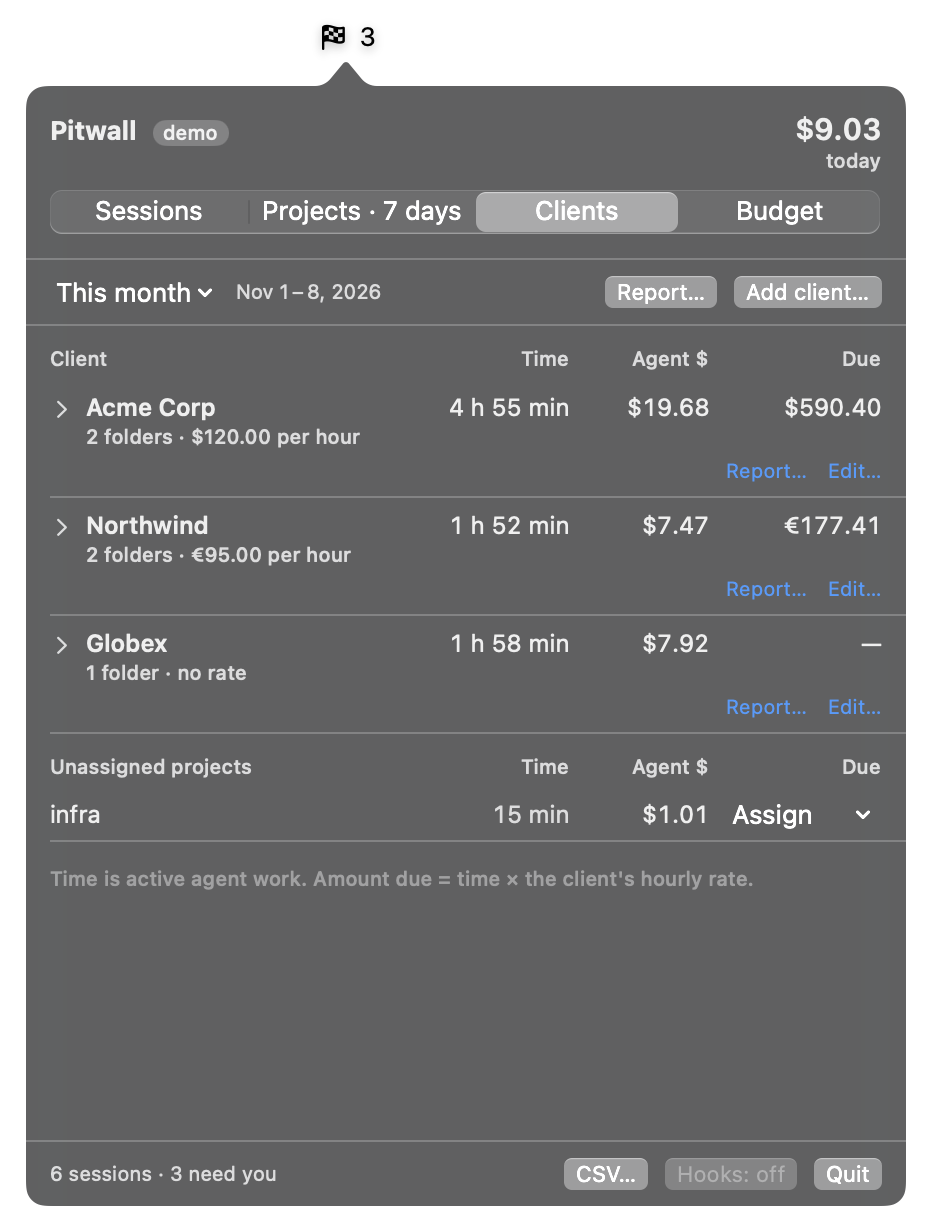
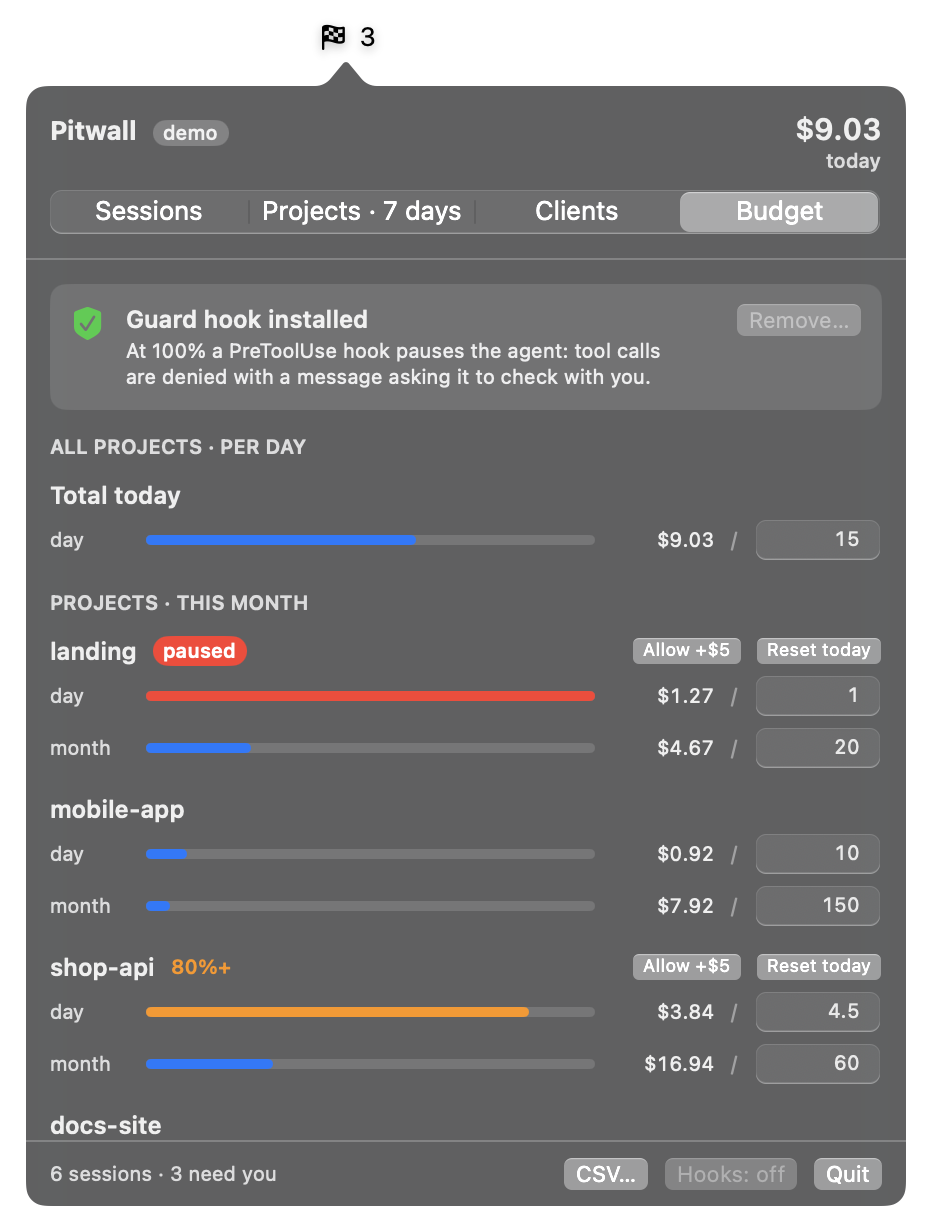
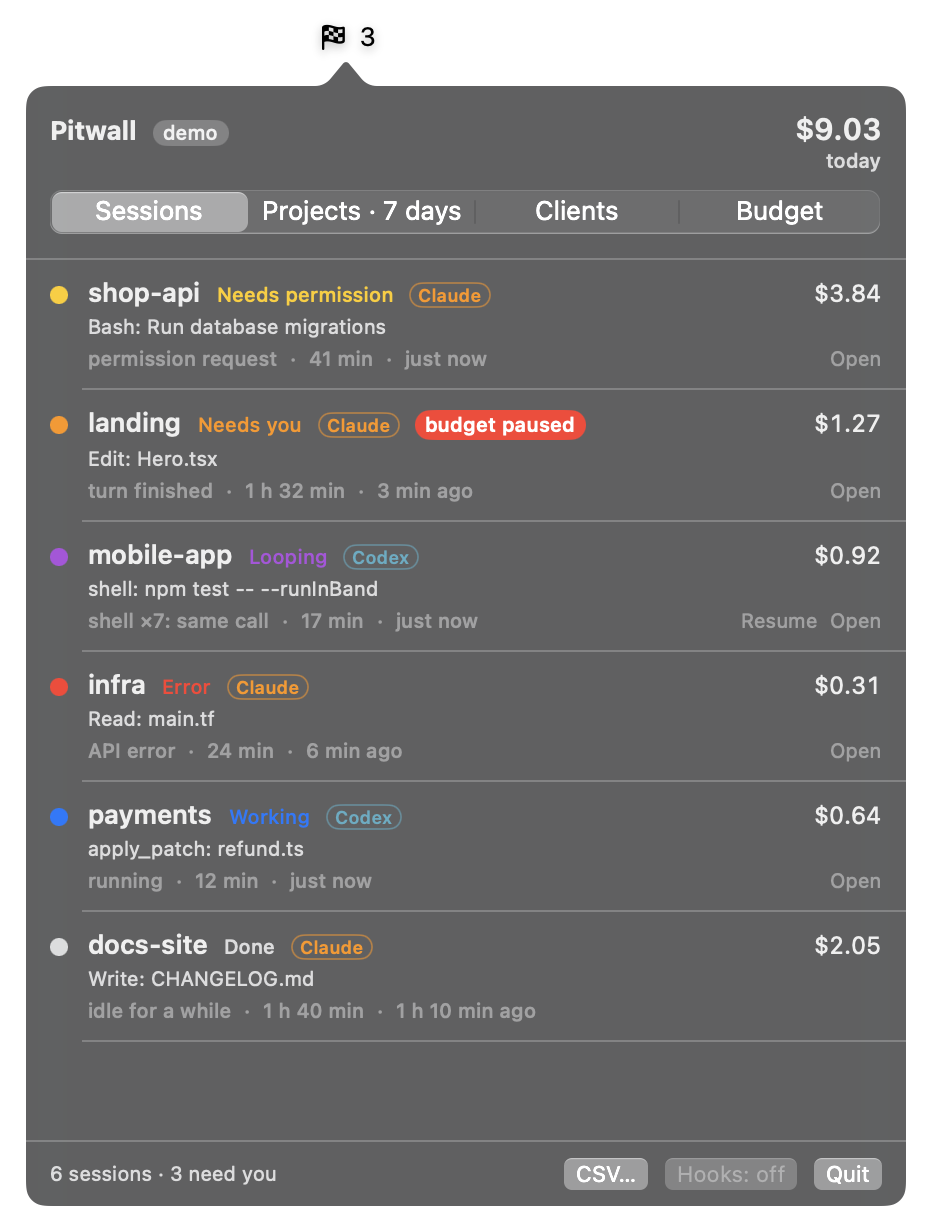
Budget tab Pitwall sessions list in the macOS menu bar Clients tab
Needs you Needs permission Looping Error Working Done
Why Pitwall

Every session on your Mac. Not only the orchestrated ones.

Orchestrators see the runs they start. Pitwall reads the transcripts Claude Code and Codex already write, so the agent you opened in a terminal at 2 a.m. shows up too. Then it turns that work into hours and commits you can bill.

Nothing to launch through us

Keep your terminal, your editor and your scripts. Any session that writes a transcript appears in the list within seconds.

Session recap

When a session ends: files changed, commits made, tool calls, errors and $. In the list and in the client report.

shop-api · 41 min
3 files · 1 commit · 58 tool calls
$3.18

Night shift

Run agents on a schedule? See every overnight cycle: duration, exit code, what it did, 14 nights of history.

#1 docs-site · changelog22 min
#2 shop-api · refunds38 min
#3 mobile-app · flaky testexit 1
The problem

Agents are fast. Babysitting them isn't.

“Your agent burned $40 in a loop while you slept.”

Same failing command, same patch, over and over. Nobody was watching the meter.

FixLoop detector + budget guard pause it.
“An agent waited 30 minutes for your yes.”

The permission prompt sat in a terminal tab behind four other windows.

FixA notification, then one click to that terminal.
“How many hours did the agent put into Acme this month?”

You know it did real work. You just can't prove it on an invoice.

FixClient reports: commits, hours, $, amount due.
Statuses

Six states. One glance.

Every session gets a colored status, its last tool call, how long it has run and what it has cost. The menu bar icon counts the sessions that need you.

Statuses come from transcripts and live processes. Optional Claude Code hooks (Notification, Stop, UserPromptSubmit) make them exact; they're off by default.

StatusWhat it means
Needs youTurn finished. Waiting for your next prompt.
Needs permissionBlocked on a permission prompt.
LoopingSame tool call or same error N times in a row (6 by default).
ErrorAPI error or refusal in the last turn.
WorkingBusy. Leave it.
DoneProcess exited, or idle for 45 minutes.
Features

Watch for free. Upgrade when it pays.

Free

Mission control

Every session, every status, 7 days of $

All sessions in one list

Claude Code and Codex side by side: project, status, last action, duration, $.

Session list

Notified only when it matters

When an agent needs you, asks for permission or starts looping. Never for "still working".

shop-apipermission
mobile-applooping

Straight to the terminal

"Open" brings forward the app that runs the agent: Terminal, iTerm2, Warp, VS Code.

Today's spend, live

Per session and in total, from the token usage in your transcripts.

Projects · 7 days

$ and active agent time per project, with daily bars.

Free

Guardrails

Included, no key needed

Budget guard

Daily and monthly $ limits per project, plus a daily limit for all projects together. Warning at 80%. At 100% a hook pauses the agent. "Allow +$5" when the run is worth it.

landing · daypaused
shop-api · day85%

Loop detector

Same tool call or same error six times in a row? The session turns Looping, you get pinged, and it can be paused until you press Resume.

shell npm test -- --runInBand×7
Pro

Bookkeeping

$24 once

Clients

Map folders to clients. Agent hours, agent $ and amount due at your rate, for this or last week, this or last month, the last 30 days or any range.

Reports your client can read

Git commits by day, the agent sessions behind them, hours, $ and the total. PDF or Markdown.

Client report
How the pause works

A hard stop. Not a surprise bill.

The budget guard is a standard Claude Code PreToolUse hook. Over the limit, it denies the next tool call with a reason. The agent stops and tells you why.

guard.sh → stdout
{"hookSpecificOutput": {
  "hookEventName": "PreToolUse",
  "permissionDecision": "deny",
  "permissionDecisionReason": "Budget limit reached for shop-api — ask the user to raise it in Pitwall. (daily limit $20.00, spent $20.41)"
}}
# The agent skips the call, stops, and tells you why.
# No state file / Pitwall not running → call allowed (fail-open).
  1. Opt-in installOne click on the Budget tab. settings.json is backed up first and your other hooks are kept.
  2. Warning at 80%A notification before you hit the limit.
  3. Pause at 100%Tool calls in that project are denied with the reason on the left. Looping sessions can be paused the same way.
  4. Fails openIf Pitwall isn't running, every call is allowed. Your agent never gets stuck because of us.
Screenshots

Lives in your menu bar.

Demo mode, synthetic data. Scroll sideways →

Pricing

Simple pricing. No seats.

Free

$0
For anyone running agents
  • Claude Code + Codex sessions
  • Live statuses
  • Notifications + jump to terminal
  • $ per session and today
  • Projects tab: 7 days of $ and time
  • Budget guard: project, day, month, all projects
  • Loop detector with optional pause
Download free

Pro For billing clients

$24 one-time
Pay once. Keep it.
  • Everything in Free
  • Clients with hourly rates
  • Hours, $ and amount due per client
  • Client reports with git commits
  • PDF and Markdown export
Get Pro free in beta
Privacy

Local-first. Literally.

Pitwall reads the files your agents already write. There is no Pitwall server to send anything to. Your code, prompts and client data stay on your Mac.

Read-only on your sessions~/.claude/projects and ~/.codex/sessions. Pitwall never edits a transcript.

Hooks are opt-inInstalled only when you click. Your settings.json is backed up first; your other hooks are kept.

Fails openIf Pitwall quits, the guard lets every call through.

Open-source coreComing to GitHub under MIT, so you can read the code that reads your files. Git is read only when you build a client report.

FAQ

Questions

Which agents does it support?

Claude Code and Codex CLI, in any terminal. Pitwall reads their session files, so there is nothing to configure to get started.

How is the $ calculated?

From the token usage recorded in each session, at API prices. For Claude Code it matched Claude Code's own cost to the cent in our checks; small background calls that never reach the transcript can make it read a few percent low. Codex on a ChatGPT plan shows the API-equivalent cost. You can override any price in pricing.json.

What happens when an agent hits its budget?

A Claude Code PreToolUse hook denies the next tool call with a short reason. The agent stops and tells you why. Raise the limit, or click "Allow +$5" or "Reset today" to continue.

Will the loop detector stop legit polling?

It can: sleep 30 && gh run view looks like a loop. Raise the threshold (6 by default) or leave auto-pause off and just get the notification.

Is Codex support as complete as Claude Code?

Statuses, cost and loop detection work for both. Codex doesn't write permission requests to disk, so its "Needs permission" is inferred from timing.

Is Pro really one-time?

Yes. $24 once for clients and client reports. The budget guard and loop detector are free: a tool that stops surprise bills should not sit behind a paywall.

How is this different from agent orchestrators?

An orchestrator launches agents for you and sees only those runs. Pitwall launches nothing: it reads the session files Claude Code and Codex already write, so every session on your Mac shows up, however you started it. Then it adds what an orchestrator does not: client hours, commits and reports you can put on an invoice.

When can I download it?

Now. The signed and notarized build is one click away: Pitwall-0.3.0.dmg (macOS 14+). Everything, including Pro, is free during the beta: leave your email below and we will send a Pro key and updates.

What do I need?

macOS 14 or later and Claude Code or Codex CLI. After the first scan Pitwall uses about 0.1% CPU.
Join the beta. It's open now.

Free during the beta, including Pro. Download the build, then leave your email for a Pro key and updates.

macOS 14+ · Claude Code or Codex CLI · Your data stays on your Mac.